Yesterday we reached maximum capacity on our file server. We have overcome the issue by removing some dated files and folders. this comes at a a time when there is a hard drive shortage due to the floods in Thailand! I am recommending a NAS device but it will be interesting if we can get ANYTHING with a hard drive due to the shortages.
Since there were some legitimate questions about the server disk issue, I wanted to take the time to educate you all on the difference between workstation / laptop disk storage and server disk storage.
PLEASE read this entire blog! I have tried to make it in layman’s terms and address a lot of points of frustration due to misunderstandings.
Server disks are different than most workstation drives in that
- They are designed to operate at performance speed. Most workstation SATA drives are 5.4k or 7.2k rotation speeds. Our server SAS drives operate at 15k rotation.
- Server drives have hardware and software that work in unison called RAID or RAID Array. Ours are set at RAID Level 5 which combines 5 drives into a single drive and each server has a hot spare which takes over in the event of a hard drive failure at a slightly reduced functionality but users would never lose data or even know that this has occurred. Our contract with Service Express covers a failed hard drive and without question they come out and replace the failed drive. At that point, the hot spare begins to move its data back to the good drive and is then ready for the next failure, if and when that occurs. We have had at least 4 occurrences of failed drives without data lose or even the knowledge of anyone on staff.
- Server hard drives are built for durability. A regular desktop hard drive would not be able to sustain itself from the constant read and write activity that occurs on a server. The failure rate would be much greater and if we did not have them in a RAID array the loss would be total in most cases.
My recommendation to overcome the disk space issue.
Get a NAS (Network Attached Storage) device that utilizes SATA drives (instead of the more expensive SAS drives) BUT that will allow me to set a RAID Array to protect us from failure and hence data loss. There are specific recommended SATA drives by NAS manufacturer that are better than the average SATA drives, but not as expensive as the SAS drives normally used for a server.
So, you may be asking the question “Why not just add a couple of drives or replace the drives in the existing server?”
Glad you asked!
- Standardization: I would like to maintain as much standardization between servers as possible.
- Time: Either option would mean having to take the entire network down and rebuild the server and restore the data back to it.
- Cost: SAS drives are expensive!
- Bang for the buck: Even if we replaced the existing 6 drives with 8, we still would not be able to get anywhere near the storage capacity a NAS would provide
Now, you are probably going to ask “Why can’t we use cloud storage instead of using our server storage?”.
- This would cause increasing speed issues with our internet connection.
- The speed of accessing and editing larger files would be a problem
- The ability to set rights on files.
- Backup and retention of data. (Especially in the case where everyone is coming up with their own solutions for cloud storage)
a. Users may totally lose or delete a file they didn’t mean to or the file may become corrupt. Without a backup, they would not be able to recover it / them.
b. If we are paying staff to create files and documents, we need a centralized place with access control to maintain that data. We would not want a situation where a staff or volunteer leaves and their data goes with them.
c. Security. Our data should be our data.
Cloud storage is probably going to be the answer ultimately. However, I do not believe we are there yet and our network is really not where it needs to be in order to support it.
That is why I have recommended the solution of a NAS storage device. It is more expensive than some solutions but it is the best fit for where we are now.

Once we have addressed our infrastructure issues (wiring, switches, staff internet, wireless internet access for staff and public access), we will then be ready to investigate utilizing cloud based storage.
I believe there will be many caveats to cloud based storage, but let’s make sure we prioritize properly and make wise decisions based on real facts.
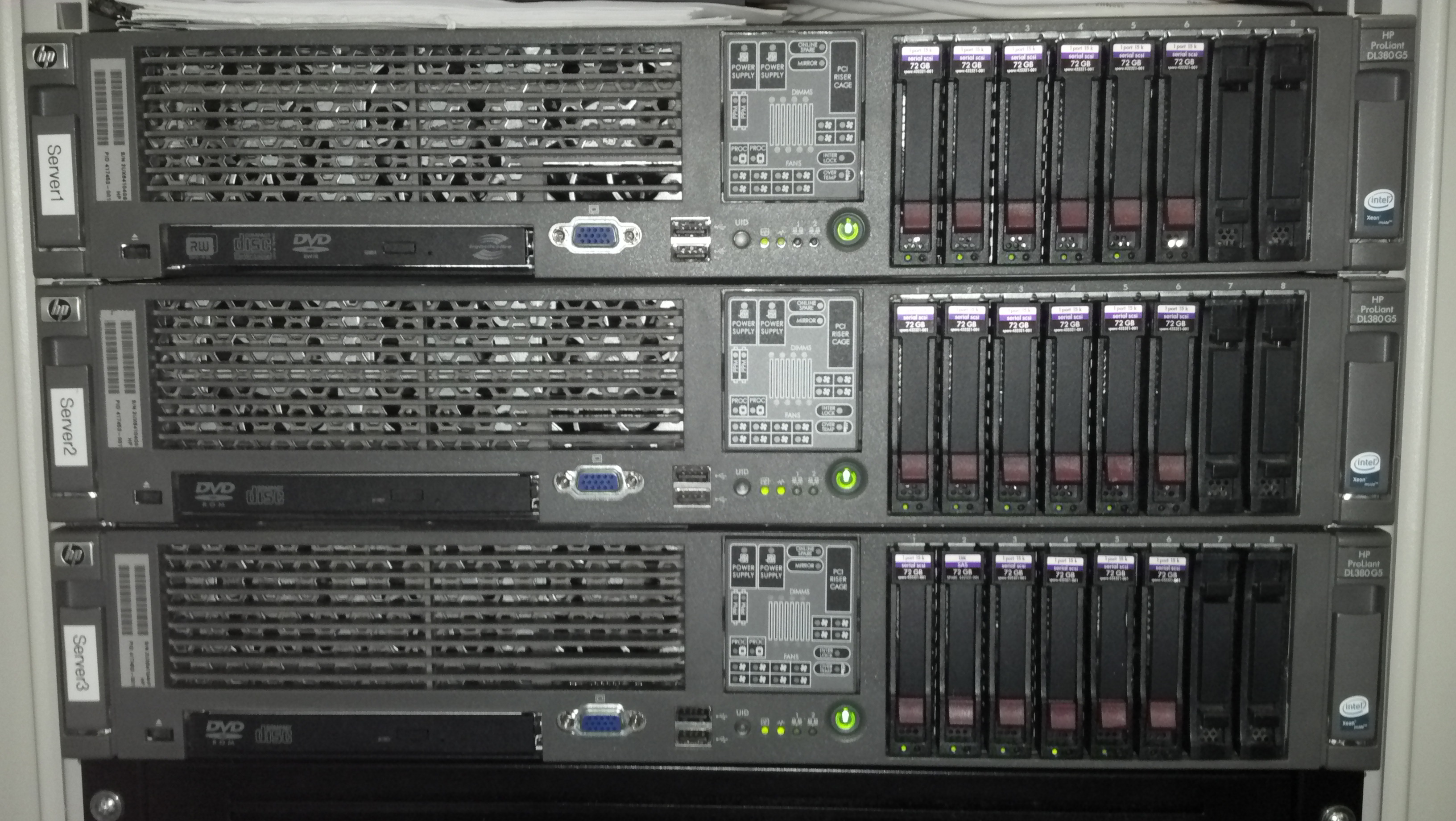
Above are the 3 Christ Church Nashville servers. Each have 5 72GB 15k SAS drives and each has a hot spare.
 Church Related Information Technology Blog